Transcript
Voice help
Say “TonyPi”, then ask a question or give an action command. TonyPi can speak and act in the same reply. Movement must be enabled for actions.
Enable movement to run matched actions.
Command summary
Ready for a command- Heard
- No words heard yet.
- Matched
- No action matched yet.
- Result
No command has run.
- Next
- Turn on the microphone to listen for “TonyPi”.
Activity timeline
Ready for a command.
Ready
OpenAI: 0 requests
No activity yet.
Voice settings
Microphone off
Wait 2–30 seconds for speech after the bell (default 10). After an answer or action finishes, listen again without another wake word. Recording ends after a pause.
The robot microphone uses the factory login or your saved profile login.
Available actions 125 sequences
Saved catalog from your robot.
No matching sequences.
Command history
Review past voice and typed commands.
Sign in to save command history and planning details to your account.
Microphone tests
DancesChecking saved files…
Robot's current position
Waiting for joint readings.
Approximate body sketch; head and hands aren’t shown.
Choose a position
After connecting, choose a position to move TonyPi.
About the selected position
Open All Positions to compare final poses before choosing.
Hiwonder action descriptions ↗Pose galleryClick to move · use the pencil to edit the name and description
Feet slide inward together when returning from a wide stance. Keep the torso supported; drawings are approximate.
Servo targets
Standing targets load from your robot automatically.
Supported left-foot stance
Full body sequence: stand → shift weight → lift right leg, over 7.5 seconds. Hold the torso securely throughout. This is a supported test pose, not verified free balancing. Drawing is approximate.
Checking saved action…
Body joints
3D view
Teach by Hand
Servos engaged
-
1 · Hold TonyPi
Support the robot while changing servo power.
- 2 · Pose it, then read
Sequence library 0
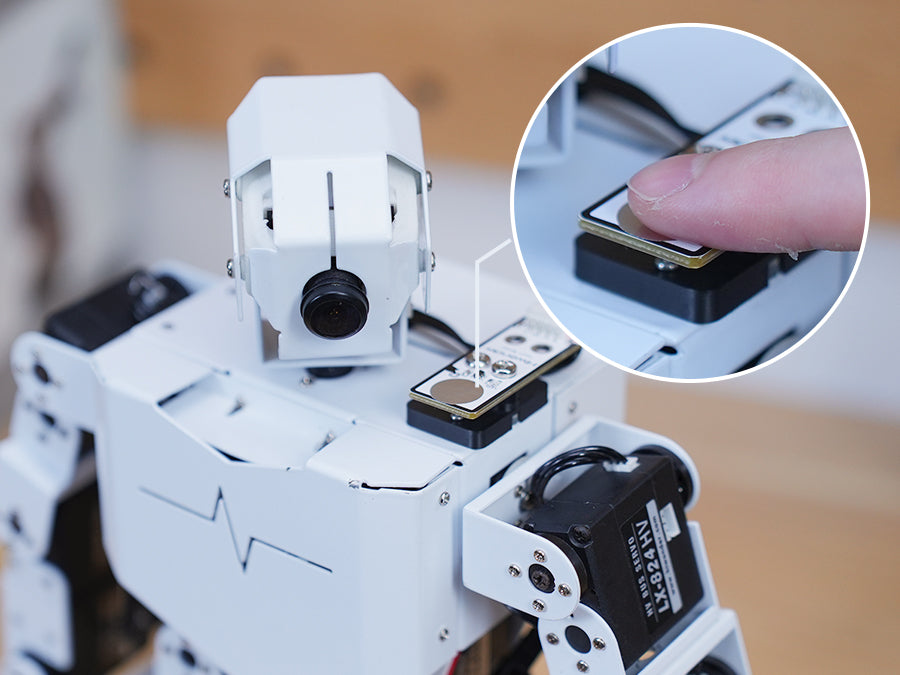 See the pictured installation guide ↗
Touch sensor
Check the shoulder pad before using it in an activity.
Connect your robot to check the touch sensor.
Touching the pad updates this check. Movement can stay disabled.
Camera view
Click the view to turn on the camera.
Choose a tracking activity, then click the camera image to select its target color.
Head pan and tilt
Enable movement to aim the head. Drag a slider for continuous movement.
Amount moved by each camera arrow click, from 10 to 500 microseconds. Saved in this browser.Connect and enable movement to control the head.
Camera calibration is in Settings → Workbench
Select a vision activity to bring the camera view back here, or return to your calibration controls.
Power on your TonyPi. Connect this device to the robot’s HW-… Wi-Fi hotspot or the same router, then search. You don’t need its IP address to start.
Health checks
Check controller readiness and troubleshoot Ethernet or Wi-Fi.
Wi-Fi check
Check it here. Unplug the cable only when we say it is ready.
Keep the Ethernet cable connected for the first check.
We’ll tell you whether you can unplug it.
Checks don’t move the robot or change its Wi-Fi settings.
Connect to home Wi-Fi
Technical details & troubleshooting
Software or hardware? A failed connection alone cannot identify the cause. A successful cable-free check proves Wi-Fi works in the tested mode; it does not rule out an intermittent fault or a problem in another mode.
Choose a robot to begin.
The Pi reports the controller address’s interface and return route.
Read signal, association and radio state from the Pi.
Connect to a robot, then run a check. These checks do not move the robot.
The browser address and the Pi’s network route are different measurements. A local relay can sit between them. The Pi reports which interface owns the controller address and its return route to its peer; it does not observe the incoming packet’s physical interface or your computer’s Wi-Fi adapter. A Wi-Fi address can still answer through Ethernet while the cable is connected. Results are snapshots; refresh after changing a cable or Wi-Fi setting.
Ethernet & Wi-Fi interfaces
Network interfaces have not been read.
Routes & health findings
Default routes have not been read.
Nearby Wi-Fi
Scan from the robot’s own radio. Scanning does not join or forget a network. Disable movement and stop activities first; the radio may pause briefly during a scan.
No scan has been requested.
Connect your robot
Enter your home Wi-Fi once. Keep the cable connected; an unsuccessful trial restores the old settings after three minutes.
Read network status to check whether guarded Wi-Fi management is installed.
The password is sent only to your robot. It is cleared from this page when submitted and is never saved in a browser profile, report or download. An open network has no password.
Open the Wi-Fi controller address in a new tab and check that it works. Leave this wired page open while you test. The bridge keeps movement disabled during the trial.
The Pi’s network manager has not been identified.
Controller & AI features
Connection and features
Checking the controller…
Manage your OpenAI key in Companion for Voice and AI camera activities.
Voice & listening
Speaking voice
Preview an AI-generated voice. Preview pauses listening.
Wake word
Hiwonder firmware instructionsLights & sensors
LED status guide
Hover or select a signal for its meaning. These are the robot’s actual LED patterns.
Movement disabled The lock means movement is off. A small lower-right X keeps that visible during other signals.
STOP faults and connection loss take priority over custom pictures and text.
Matrix brightness
Level 0 is the dimmest. Use Clear in the live display to turn it off.
Ultrasonic lights
Use different colors on each side during a dance. The previous colors return afterward.
Live display
LED matrix
Not connected
Matrix stays dark? Check the wiring.
Connect TonyPi to use its sensors and display.
Try “How far away is the obstacle?”, “Show a heart”, or “Make the matrix brighter.” Movement can stay disabled.
Workbench
Activity library
Show activities hidden from Vision and Activities in this browser.
Workbench tools
Robot calibration
Calibrate a new robot Servo test historyAdvanced calibration
Joint alignment, camera colors, and factory initialization. Open when needed.
Advanced calibration
Joint alignment, camera colors, and factory initialization. Open when needed.
Color calibration
Load the robot’s saved LAB thresholds, preview a color in the camera, and save only the settings you have tested under your current lighting.
Checking calibration support…
Standing initialization
Inspect the factory standing activity before starting it. Initialization can move the robot; keep it supported and use its explicit activity controls.
ADVANCED / JOINT ALIGNMENTJoint calibration
Small alignment offsets. Separate from your pose controls.
Joint calibration
Small alignment offsets. Separate from your pose controls.